You model 52 − 37 on the board. Everyone nods. Then the worksheet comes back, and half the class wrote 25.
They didn’t forget the steps. They never saw why the steps exist. To a seven-year-old, “you can’t take 7 from 2, so borrow” sounds like a rule someone made up. When the rule fades, they fall back on the one that feels fair: take the small number from the big number.
Regrouping clicks when kids see that a ten is just ten ones stuck together, and that you can snap them together or break them apart whenever you need to. This post covers the misconceptions to watch for, a teaching sequence that builds real understanding, and how to keep the blocks, the written algorithm, and the worksheet showing the same thing.
Why regrouping is so hard for kids
Almost every regrouping mistake comes from one gap: the student is treating each column as a separate one-digit problem instead of part of one number. Here are the errors you will see most:
| What they write | What they’re thinking |
|---|---|
| 52 − 37 = 25 | “7 take away 2 is 5.” Subtracts the smaller digit from the bigger one in every column. |
| 47 + 25 = 612 | “7 + 5 = 12, write 12.” Doesn’t see that 12 ones is 1 ten and 2 ones. |
| 47 + 25 = 62 | Wrote the 2, but the carried ten disappeared. |
| 403 − 128 = 285 | No tens to break, so they jump to the hundreds and turn the 0 into 10, forgetting that one of those tens went to the ones. |
None of these are careless mistakes. Each one is a reasonable guess from a student who doesn’t yet picture 52 as 5 tens and 2 ones. More drills won’t fix that, but seeing the blocks will.
A teaching sequence that sticks: concrete → pictures → numbers
This is the classic CRA progression (concrete, representational, abstract). The trick is not to rush through it. Kids should keep moving between stages until each one predicts the next.
1. Concrete: build it with blocks
Start with addition. Build both numbers on a place-value mat, ones in the ones column and tens in the tens column. Push them together. When the ones column has 10 or more, stop and ask: “Can we trade?” Ten ones become one rod, and the rod moves to the tens column.
For subtraction, build only the top number. When there aren’t enough ones to take away, the class has a real problem to solve, not a rule to remember. The fix is to break a ten into 10 ones. Now the move kids used to call “borrowing” is something they can see happen.
2. Representational: draw it
Swap the blocks for quick sketches: sticks for tens, dots for ones. Kids circle 10 dots and draw an arrow to the next column when they trade. When they break a ten, they cross out one stick and draw 10 dots. Drawings are slower than blocks, which is useful here because kids have to think about each trade as they draw it.
3. Abstract: write it, next to the picture
Introduce the written algorithm alongside the blocks, not after them. Every carry digit should match a trade students just watched, and every crossed-out digit should match a ten they just broke. When kids can tell you which block move a little “1” stands for, they’re ready to drop the blocks.
Mind the words you use
“Borrow” suggests you will give it back, and “carry” doesn’t say what is moving. Many curricula now say regroup, trade / break, or compose / decompose. Pick the words your district uses and use them every time, on the board, on worksheets, and in your own talk.
Where it usually breaks down: board vs. desk
Even with a good sequence, there is a practical snag. You model with blocks on the board, but the worksheet in front of students has different numbers. Kids who were following along now have to transfer the idea to new problems before it is solid. And physical blocks make a mess. They roll off desks, a set never has enough tens, and nobody can see the tiny cubes from the back row.
That gap is exactly what Regrouping Lab was built to close.
Regrouping Lab: the same problem on the board and on every desk
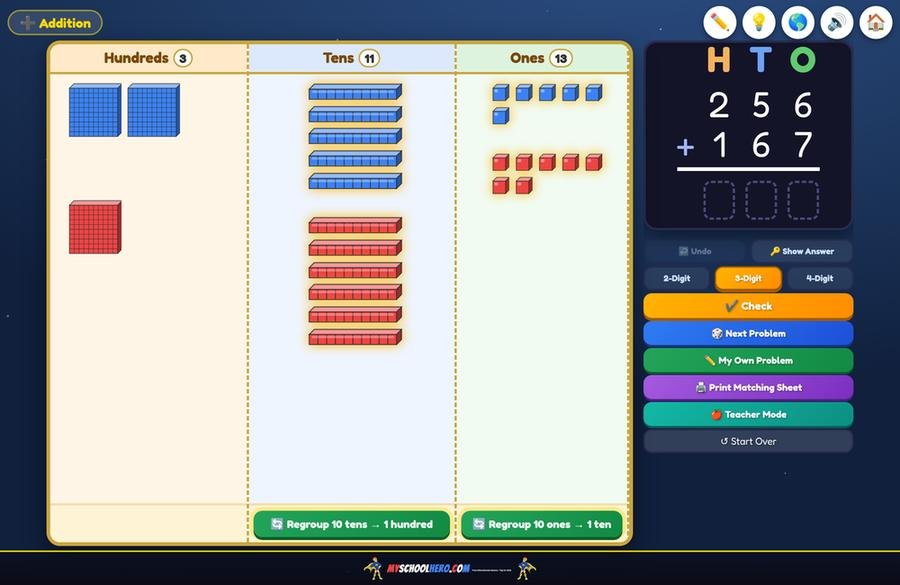
Regrouping Lab is a set of virtual base-ten blocks for your interactive board, built for addition and subtraction with regrouping in grades 1–4. The blocks and the written algorithm sit side by side, so every carry and every borrow appears in the problem card as students move the blocks.
- Trade and break with one tap. When a column hits 10, a glowing button trades 10 ones for a ten (or 10 tens for a hundred). In subtraction, a break button smashes a ten into 10 ones.
- Or do it by hand. Kids can drag a box around 10 blocks and slide the group into the next column, then watch it snap into one bigger block. That’s the closest thing to doing the trade with real blocks.
- 2-, 3-, and 4-digit problems, up through thousands, so you can use it from 1st grade composing a ten to 4th grade fluency review.
- Your district’s vocabulary. Switch the button words between Regroup, Trade / Break, and Compose / Decompose.
- Safe to use live. Built-in pen for writing on the board, Undo, and Show Answer, so a wrong tap in front of 25 kids is no big deal.
The Hungry Monster: a reason to regroup
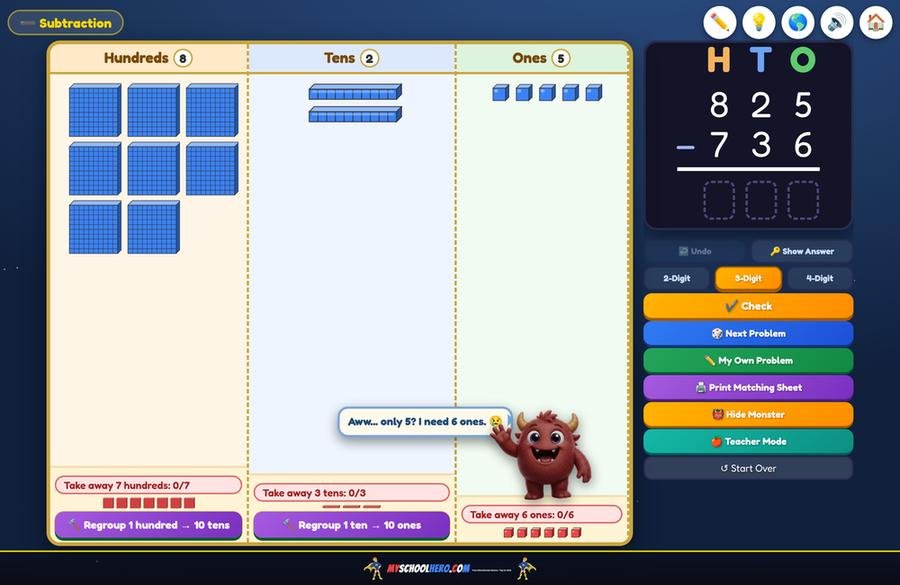
Subtraction is where kids lose the thread, so subtraction gets a character. Turn on the Hungry Monster and he asks to eat a certain number of blocks from each column. Kids drag blocks onto him and he wiggles with every bite. When there aren’t enough ones, he gets sad (“Aww… only 5? I need 6 ones.”), and the class has to break a ten to feed him.
That turns “you can’t take 6 from 5” from a rule into a problem the class wants to solve. You will hear kids shout “break a ten!” at the board, and that is the understanding you’re after.
Print the exact problems you’re modeling
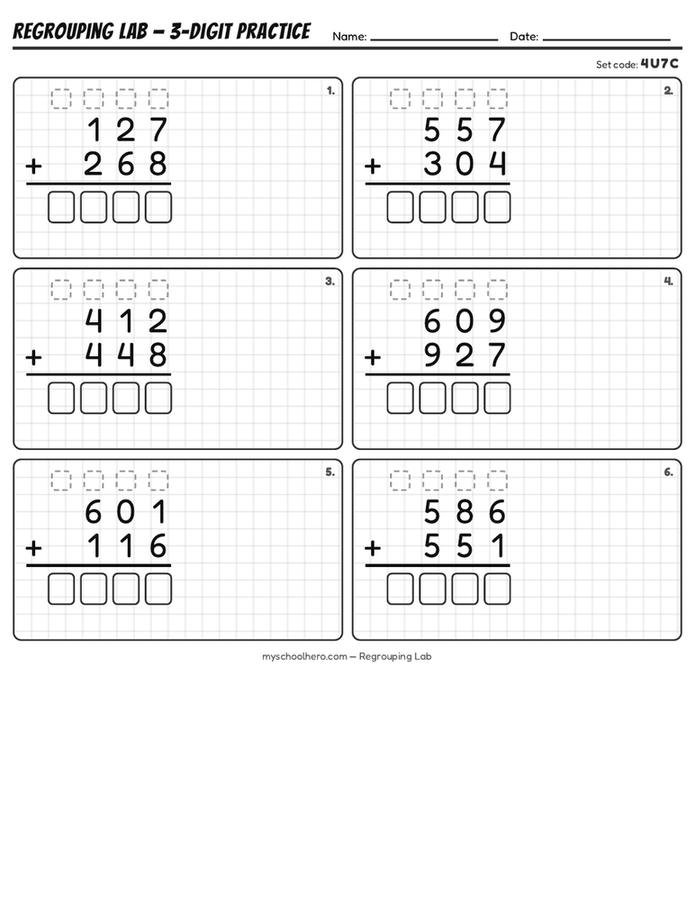
This is the part no box of plastic blocks can do. Print Matching Sheet prints the problem on the board right now, plus practice problems and an answer key, on grid paper with dashed boxes for carries and borrows.
Teacher Mode prints whole practice sets (6 or 8 problems) at six levels: 2-digit, 3-digit, 4-digit, two mixed reviews, and blank grid paper for kids to write their own problems. After you print, the board loads the same problems, and Next Problem walks through the sheet with the class.
Printed the sheet at your desk or at home? Every sheet carries a set code. Type it into the board and the class works the same numbers you’re modeling. Nobody has to copy problems off the board.
For multilingual classrooms
Regrouping Lab runs in English, Spanish, French, and Portuguese, including the printed worksheets. Newcomers can follow the blocks while reading directions in their home language.
Ways to use it in your week
- Whole-group launch (10 minutes). Model 2–3 problems with the blocks, and ask kids to predict each trade before you tap.
- We do / you do. Print a Teacher Mode set. Work problem 1 together on the board, then let kids try 2 and 3 while you circulate. Come back to the board to check.
- Hungry Monster warm-up. Put one subtraction problem on the board each morning and let a student feed the monster.
- Small-group intervention. Pull the kids who wrote 25 for 52 − 37 and have them do the breaking by hand, dragging blocks instead of tapping the button.
- Sub plans. Leave a printed set and its set code. The sub types the code, and the lesson runs itself.
Standards covered
| Standard | What it asks |
|---|---|
| 1.NBT.C.4 | Add within 100 using models and place value; understand that sometimes you compose a ten. |
| 2.NBT.B.5 | Fluently add and subtract within 100 using place-value strategies. |
| 2.NBT.B.7 | Add and subtract within 1000 with models; compose or decompose tens and hundreds. |
| 3.NBT.A.2 | Fluently add and subtract within 1000 using strategies and algorithms based on place value. |
FAQ
What grade do kids learn regrouping?
Students first compose a ten when adding in 1st grade (1.NBT.C.4). Regrouping in both addition and subtraction within 1000 is a major 2nd-grade goal (2.NBT.B.7), and 3rd graders are expected to do it fluently (3.NBT.A.2). Many 4th graders still need review before multi-digit work.
Should I teach “borrowing” or “regrouping”?
Most current curricula use “regroup,” “trade,” or “decompose,” because “borrow” suggests the ten gets paid back. What matters most is choosing one set of words and using it consistently. Regrouping Lab lets you switch its button words to match.
Do I still need physical base-ten blocks?
Hands-on blocks are great, especially for small groups. Virtual blocks are better for whole-class modeling: everyone can see them, a set never runs out of tens, and you can undo a mistake instantly.
Is Regrouping Lab free?
There is a free demo with 2-digit problems, no signup needed. The full version (3- and 4-digit problems, printing, Teacher Mode, and set codes) is a $19 one-time purchase with no subscription. One key unlocks up to 3 devices, like your classroom board, your laptop, and your home computer.
Do students need accounts?
No. It runs in your browser with no student logins and collects no student data.
Try it on your board tomorrow
Open the free demo on your board. It starts with 82 − 47. Turn on the Hungry Monster and let the class work out what to do when he wants 7 ones and there are only 2.
▶ Try Regrouping Lab free (no signup)
Want 3- and 4-digit problems, printing, and set codes? Get the full version — $19 once.
Looking for more free practice? See Chromebook Math Centers That Actually Run Themselves and all our free 2nd grade games.